Instant capture with hotkeys
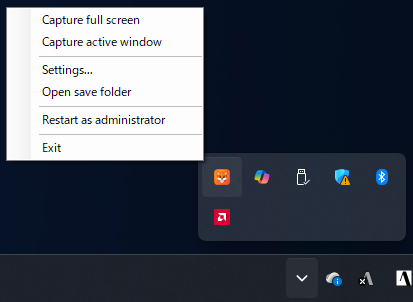
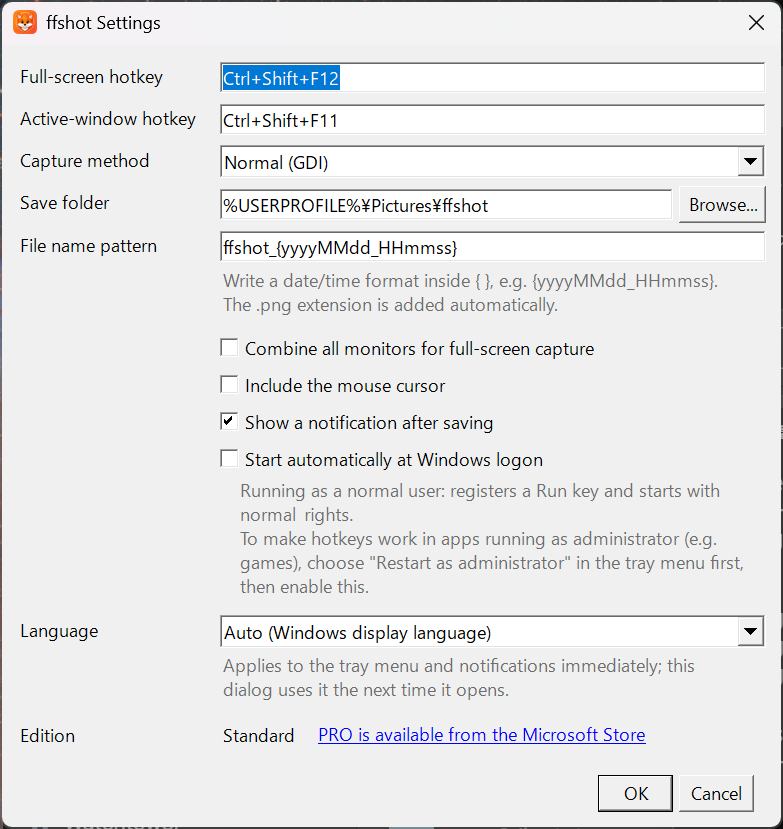
Separate hotkeys for full screen and the active window. Defaults are Ctrl+Shift+F12 and Ctrl+Shift+F11.

Lives in the tray and saves PNGs with a hotkey.
A Windows screenshot app that can even capture DirectX full-screen apps.
Windows 10 (version 2004+) / Windows 11 (64-bit) · English / Japanese
日本語 | English
Separate hotkeys for full screen and the active window. Defaults are Ctrl+Shift+F12 and Ctrl+Shift+F11.
Choose between Normal (GDI) and Direct3D / DXGI Desktop Duplication. Borderless full-screen apps that come out black with GDI can be captured.
Use "Restart as administrator" in the tray menu so hotkeys work even while an elevated game or tool is in the foreground.
Set the save folder, file name pattern, mouse cursor inclusion, combining all monitors, save notifications, start at logon, and more.
Follows the Windows display language automatically. You can also fix the language in the settings.
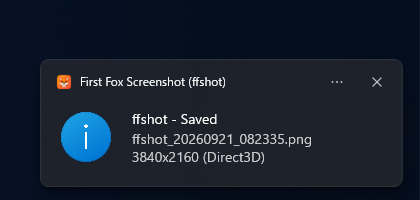
Stays in the tray and captures only when you ask. Images are saved as PNG to Pictures\ffshot.
The standard edition adds a watermark (icon, "ffshot" and the URL of this site) to the bottom-right corner of every saved PNG.
In the Microsoft Store version, buying the "ffshot PRO" add-on (one-time purchase) removes the watermark. Buy it from "Upgrade to PRO..." in the settings or the tray menu. The Microsoft Store keeps track of the purchase, so it also works offline.
| Supported OS | Windows 10 version 2004 or later / Windows 11 (64-bit) |
|---|---|
| Format | Saved as PNG |
| Capture backend | Normal (GDI) / DirectX (Direct3D / DXGI Desktop Duplication) Falls back to GDI automatically where Direct3D capture is unavailable (Remote Desktop, etc.) |
| Settings | Changed from the settings dialog in the app |
| Get it from | Microsoft Store (coming soon) |
For bug reports and feature requests, please email info@uehatsu.info.
See the Privacy Policy and the Legal Notice (Specified Commercial Transactions Act) (both in Japanese).